
NineCasino Login Guide – Register In and Start Playing
If you want to jump into slots, live tables, or sports at Nine Casino, you first need a quick account and login setup. We have kept the whole thing simple so you can get from sign-up to first spin in just a few minutes at NineCasino.
Getting Started with NineCasino
NineCasino runs fully in your browser, so you do not have to download any extra software or apps to get going. You just open the official site, hit Sign up or Log in in the Nine Casino header, and you are already on the right track.
Once you have an account, you unlock over 5,000 games, missions, tournaments, and our loyalty suite with missions, wheel of fortune, and extra rewards. You will also be able to grab the welcome package and fast payouts once Nine Casino verification is done.
What you need before you start;
- A valid email address that you actually use, otherwise we simply cannot help you recover your password later.
- One personal payment method in your name only, since third-party deposits are not allowed and may lead to confiscated winnings.
- A document to confirm you are over 18 and allowed to gamble in your country, since we only accept adult players from permitted regions.
- A few minutes to complete KYC later if you want quick withdrawals and access to all features.
How to Register at Nine Casino
You will create your NineCasino account directly on the website, in two short steps, without installing anything. The whole registration usually takes just a couple of minutes if you have your basic details ready.
Creating Your Casino Account
First, go to the official NineCasino site and click the Sign up button in the header. A simple form will pop up where you enter your email, choose a strong password, and accept the terms while confirming you are over 18.
In the second step, you will fill in your personal details like full name, date of birth, address, and phone number so we can keep your profile compliant and secure. Then you only need to confirm your email by clicking the link we send, and your account becomes active.
| Step | Action on the site | What you enter |
| 1 | Click “Sign up” / “Create an account” | Email, password |
| 2 | Tick T&Cs and age confirmation | Consent and promo preferences |
| 3 | Fill personal info form | Name, date of birth, address, phone |
| 4 | Confirm email via link | Activates account and login access |
Bottom line, as long as your data is accurate and matches your documents later, you will be ready to deposit and play without annoying surprises at withdrawal.
Registration Requirements
NineCasino only accepts one account per person, household, IP, and device, so you should never try to open duplicates. If we spot multiple accounts, we can block them and void bets, deposits, and winnings linked to duplicate profiles.
You must provide truthful information, including a valid email address, real name, correct residential address, and your actual date of birth. These details must match your identification and proof of address later, or KYC may fail, and withdrawals can be blocked.
Key registration rules:
- Minimum age is 18, or higher if your local legislation sets a different online gambling age.
- Only players from countries where online gambling is legal and not restricted in NineCasino’s T&Cs can sign up.
- You must use your own payment methods, not business, shared, family, or third-party accounts.
- All information must be kept up to date, and you should notify support if anything changes.
Now, once this is sorted, your next step is simply logging in to Nine Casino and getting back to your games whenever you like.
NineCasino Login Process
Logging into Nine Casino works almost the same whether you are on a desktop or a mobile browser. You just need your email and password, or you can use Google social login if you prefer.
We use SSL encryption to protect your connection and account actions, so your NineCasino login details and payments stay secure as long as you keep your credentials private. If you ever forget your password, you can recover access using the email tied to your account.
Desktop Login
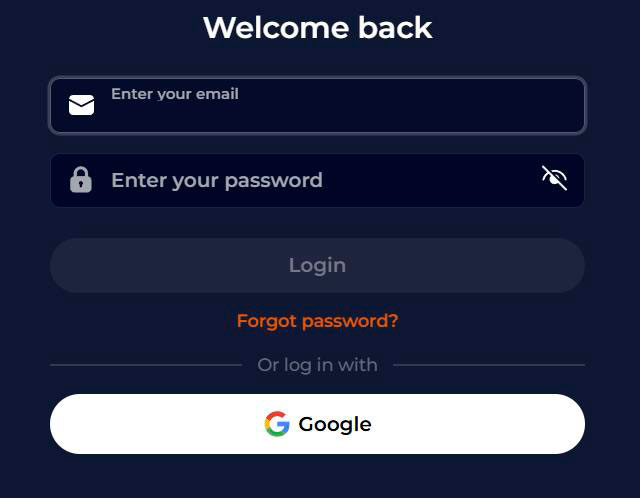
On the desktop, open the official NineCasino homepage and look at the top right corner for the Log in button. Click it to open the login modal titled “Welcome back”.
You will see two fields for your email and password, and a main Nine Casino Login button. There is also a Forgot password link under the form, plus an option to sign in to Nine Casino with Google if you prefer social login.
Quick desktop login checklist for Nine Casino:
- Use the correct site and SSL connection visible in your browser.
- Click “Log in” in the header to open the modal.
- Enter the same email and password you used during registration.
- If you see an error, double-check spelling, caps lock, and your keyboard layout.
Once logged in to Nine Casino, you can head straight to the lobby, browse 5,000 games, and open the cashier to deposit or withdraw.
Mobile Browser Login
On mobile browsers, the process is basically the same, just adapted to a smaller screen. You visit Nine Casino in your mobile browser and use the Sign in button in the top area of the page.
The same email and password fields appear, and you can still tap Forgot password or use Google login if available in your region. Since NineCasino is a no-download casino, you do not need a dedicated app; your browser is enough.
Nine Casino’s mobile sign-in tips:
- Always access NineCasino through a bookmark or direct URL instead of random links.
- Use a stable internet connection, as poor mobile data can interrupt sessions.
- Avoid signing in to Nine Casino on shared devices or public Wi Fi without logging out after your session.
- Use auto fill only on your personal smartphone with lock screen security active.
Now that login is clear, the next big piece is verifying your account so cashouts and bigger wins move smoothly.
Account Verification and KYC
To keep the casino safe, legal, and free from fraud or money laundering, NineCasino follows a strict KYC policy. That means before we can process withdrawals, we need to confirm your identity and address using official documents.
If you complete KYC soon after registration, you will speed up your future Nine Casino verifications and enjoy faster payouts and full access to tournaments and promotions.
KYC Policy and Document Requirements
At a minimum, we will ask for your full name, date of birth, permanent address, and an identification number via your registration form and later document checks. The core documents are a valid passport or national ID card plus a proof of address that is not older than 6 months, like a utility bill or bank statement.
Depending on the level of checks, we might also need additional items like a driver’s license, a bank card photo, or a selfie with your ID near your face to confirm the document really belongs to you. All documents must be clear, readable, and show the same details you gave us during registration.
| Type | Examples accepted |
| ID document | Passport, national ID card |
| Address proof | Utility bill, bank statement, government letter |
| Additional ID (optional) | Driver’s license, extra national ID |
| Ownership proof | Bank card front photo, e-wallet statement |
| Selfie check | Selfie with your document next to your face |
If documents are illegible, damaged, do not match your account data, or are simply not acceptable forms, we may reject them and ask you to upload better versions. In some cases, we can also request video verification or a phone call to the number you provided.
Verification Timeline
Once you upload your KYC documents, your status usually moves to a Temporarily Approved state while our team reviews everything. During this period, you can still use the platform normally, but withdrawals may be limited until full approval.
The KYC team generally has about 24 hours to check your documents and email you with the result: approved, rejected, or more information needed. In most straightforward cases, Nine Casino verification is processed within 24 to 48 hours, especially if the images are clear and match your registration details.
What happens if you delay KYC:
- No withdrawals will be processed until Nine Casino verification is fully completed.
- If you fail to provide the requested documents within around 15 days, we may treat it as a breach of terms and confiscate winnings.
- If KYC fails, additional deposits or withdrawals may be blocked until the issue is resolved.
- For security reasons, we might keep funds locked while we complete enhanced due diligence checks.
Big plus, once you pass KYC successfully, later withdrawals are usually smoother and only subject to standard activity checks on your account.
Account Security and Password Management
We take security seriously, but you are part of the team here, too. You pick your own username and password during Nine Casino registration, and you are fully responsible for keeping those login details secret.
NineCasino uses SSL encryption for transaction security and treats all customer data as confidential, without selling it to third parties. As long as you protect your credentials, your gaming balance, and personal data are well guarded on our side.
Account Recovery Options
If you forget your password, the recovery process will only work if you registered a valid email address at Nine Casino. In this case, you simply click the Forgot password link in the login modal and follow the instructions we send via email.
You might also be asked to confirm some personal details if there is anything suspicious or if we need extra checks for security. Support is available around the clock through live chat and email to help if you get stuck.
Security best practices:
- Use a strong password with a mix of letters, numbers, and symbols, not your name or date of birth.
- Never share your login credentials with anyone, including friends or supposed “helpers”.
- Do not save your password on public or shared devices, and always log out after playing.
- Contact support immediately if you suspect your account has been accessed by someone else.
Bottom line, if someone logs in with your correct credentials, we must treat actions as coming from you, so it really pays to lock those details down.
Troubleshooting Login Issues
Sometimes logins misbehave, and that is annoying when you just want to spin. The good news is that most NineCasino login issues are simple to fix with a few quick checks on your side.
If your email or password is wrong, you will see an error and should double-check spelling, keyboard layout, and that the caps lock is off. If you are trying to access from a restricted country, your account may be blocked under our T&Cs.
Common login problems and fixes:
- Forgotten password: Use the Forgot password link and follow the email instructions to set a new one.
- Invalid email: If you typed a random or incorrect email at Nine Casino registration, our recovery emails cannot reach you, and support will have limited ways to help.
- Multiple accounts: Having more than one account per person or device can lead to blocks, and you will need support to sort it out.
- Technical issues: Clear your browser cache, try another browser or device, and make sure you are visiting the correct NineCasino domain.
If none of this works, just reach out via live chat or email, and our support team will check logs and help you regain access where possible.

FAQ
No, Nine Casino is fully web-based, and you do not have to download any software or mobile app to register, log in, or play.
Registration typically takes just a few minutes if you have your email and personal details ready.
KYC is required at least by your first withdrawal, but we strongly recommend completing it right after registration to unlock faster cashouts and tournaments.
You will need a valid ID document like a passport or national ID, plus a recent proof of address not older than 6 months, and sometimes an extra selfie or card photo.
If your documents are clear and match your account data, KYC is generally processed within 24 to 48 hours.
No, only one account per person, household, IP, and device is allowed; we may block profiles and forfeit winnings gained on duplicates.
If you lose access to the email linked to your account, recovery becomes harder, and we will need extra checks via support, so it is important to use an email you control long term.